Don’t Give Your AI Agent API Keys. Give It a Gateway.
Why credential injection at the network layer changes the agent security model — and what it actually takes to build.

Previously I wrote about NanoClaw and all the learnings there that can be gleaned. In this article I double-click into the HTTPs proxy, how it works and what it solves.
When you’re trying to moving fast, credential setup is the annoying step you have to do to get to the fun part (building agents or workflows). So you create an API key, drop it in an env var, make sure the agent can read it. Done. Repeat for every API the agent needs.
It works. Until you start asking some uncomfortable questions.
If the agent is compromised, as in prompt injected, tool output manipulated, runaway loop hitting endpoints it shouldn’t, what’s the blast radius? Every API key it holds. Which might be GitHub, Gmail, your internal database, Stripe. The agent doesn’t distinguish between “things I should do” and “things I’m able to do.” Those are the same set.
What if you want to give one agent access to GitHub but not Google Drive? With env vars you’re copying keys around, creating per-agent credential sets, hoping nothing drifts. What if a key needs to be rotated? You have to find every place it was injected. What if you want to know which agent made which API call? The key doesn’t know who’s holding it.
The problem isn’t the secrets manager you chose or whether you used dotenv or Vault. It’s the assumption underneath all of it: that the agent needs to know the credential in order to use it. That assumption is what a gateway challenges.
The core idea: inject at the network layer
Here’s the reframe: an agent doesn’t need to hold a credential to use it. It just needs someone else to inject it at the right moment.
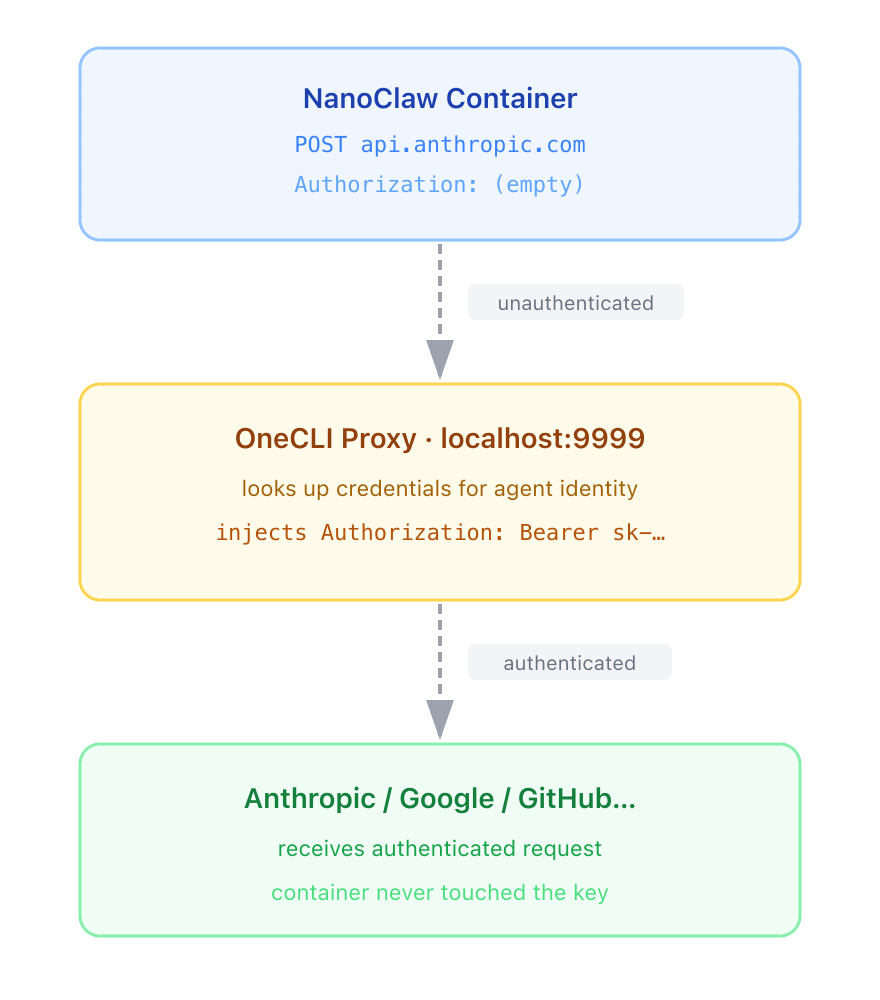
The way this works in practice: the agent is configured to send all its traffic through an HTTP proxy, the gateway in this case. When it wants to call api.github.com, it doesn’t call GitHub directly. It sends the request through the gateway, which intercepts it, injects the right GitHub token into the headers, and forwards it upstream. The agent makes the same API call it always did. It just never saw the token.
What about HTTPS?
For HTTP traffic this is straightforward. HTTPS is trickier, because the whole point of TLS is that no one in the middle can read it. Gateways that do this solve it with a technique called MITM TLS: the gateway generates its own Certificate Authority, and the agent is configured to trust it. When the agent opens an HTTPS connection to GitHub, the gateway intercepts the TLS handshake, presents a dynamically-generated certificate for api.github.com signed by that local CA, and terminates the connection itself. The agent sees a valid cert, accepts it, and the gateway can read and modify the plaintext traffic before opening a separate TLS connection to the real GitHub. The agent never notices.
A more detailed example
OneCLI is a great example of how this works. OneCLI is an open-source agent gateway. The gateway is written in Rust; source is at github.com/onecli/onecli. It’s built primarily by the creators of NanoClaw to be used by agents.
Here’s how OneCLI implements this:
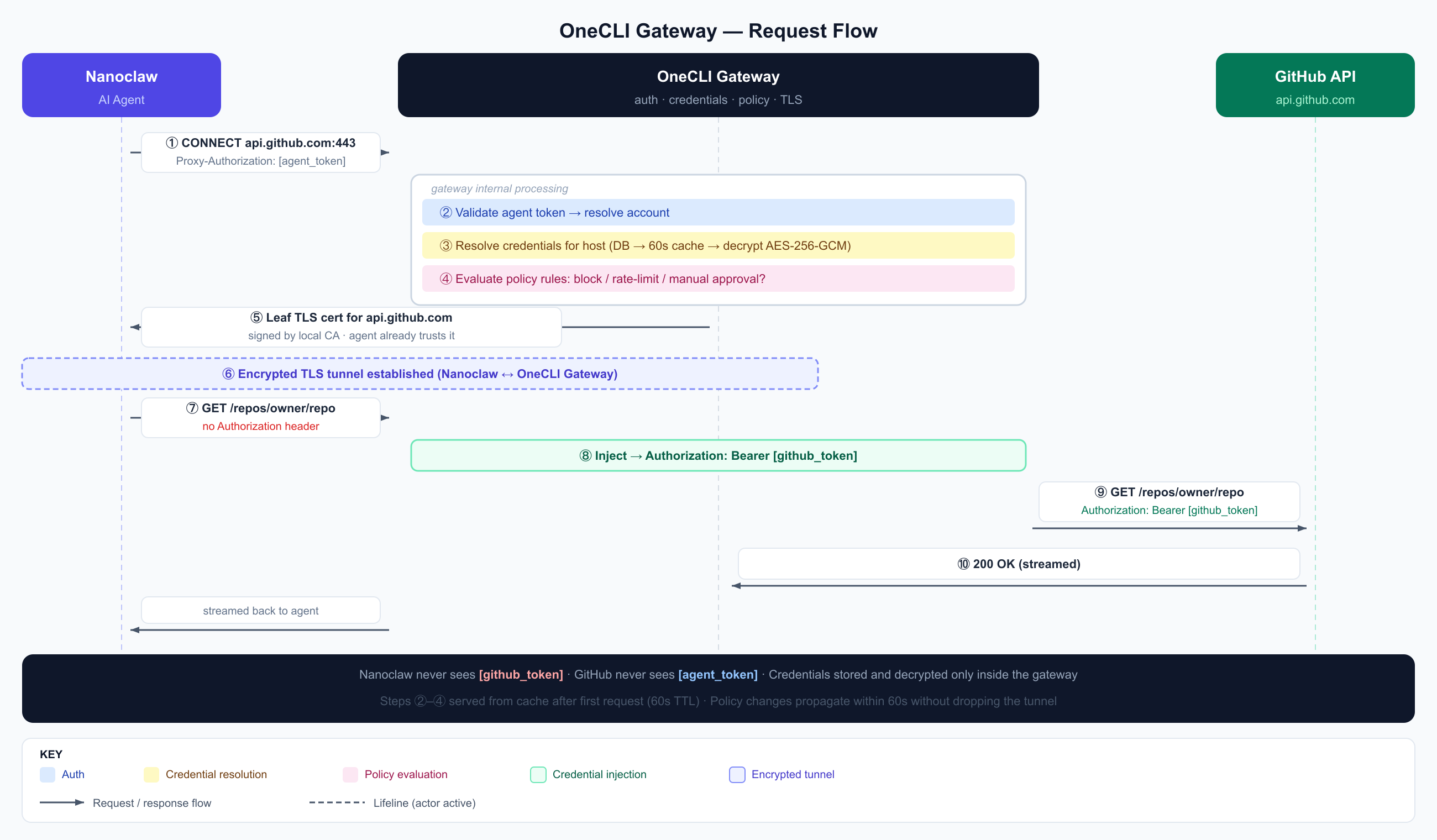
CONNECT — NanoClaw tells the gateway “I want to talk to GitHub” and proves who it is with its agent token.
Validate — The gateway checks the token is real and figures out which account it belongs to.
Resolve credentials — The gateway looks up what GitHub token is stored for this account. Decrypts it. Caches the result for 60 seconds so it doesn’t repeat this on every request.
Check policy — Should this request be blocked? Rate-limited? Held for human approval? Decision made before anything is forwarded.
Leaf TLS cert — The gateway generates a fake-but-trusted certificate for api.github.com, signed by a local CA NanoClaw already trusts. This is what makes HTTPS interception possible.
Encrypted tunnel — NanoClaw thinks it’s talking directly to GitHub. It’s actually talking to the gateway through an encrypted tunnel.
Request (no auth) — NanoClaw sends its API request normally. No API key — it doesn’t have one.
Inject — The gateway adds the real GitHub token to the request headers before it leaves.
Forward — The gateway opens a real connection to GitHub and sends the request, now with valid credentials.
Response — GitHub replies. The gateway streams it back to NanCclaw. From NanoClaw’s perspective, it just got a normal API response.
As such, the agent’s threat surface just changed. Even if it’s fully compromised, it can’t exfiltrate an API key it never had.
Credential resolution is the hard part
Getting traffic through the gateway is the easy part. Knowing which credential to inject for which request, for which agent — that’s where the complexity actually lives.
A production gateway needs at minimum:
Per-agent scoping. Some agents should only see credentials explicitly assigned to them. Others can inherit everything the account has access to. Different agents should see different credentials. I might have a family agent and a work agent, that both require different Google credentials.
OAuth token refresh. Stored OAuth tokens expire. The gateway needs to handle this transparently — check expiry at resolution time, refresh with the provider if needed, persist the new credentials, then inject. If this breaks, the agent gets a 401 from upstream and has no way to fix it.
Multi-connection disambiguation. What happens when the agent has two GitHub connections — a personal one and a work one? The gateway can’t guess. OneCLI’s solution: require the agent to pass an x-onecli-connection-id header when multiple connections exist for the same provider. If it doesn’t, the gateway returns a 409 with both options listed. Not elegant, but it works.
Caching. Hitting the database on every proxied request isn’t viable. Resolution results are cached — OneCLI uses a 60-second TTL — so a burst of API calls doesn’t become a burst of database reads. The tradeoff: credential or policy changes take up to 60 seconds to propagate.
Policy as a first-class primitive
Access control isn’t binary. “Can reach GitHub” and “can do anything on GitHub” are very different permissions. A production gateway needs a policy layer — and that policy layer should be as expressive as the credential layer.
The meaningful primitives are three:
Block. Some paths should be off-limits entirely. An agent that manages documentation shouldn’t be able to DELETE /repos/{owner}/{repo}. A block rule is a firewall rule at the application layer: host pattern, path pattern, optional method. Matched requests get a 403, no forwarding.
Rate limiting. Not to protect you from cost (though that’s a side effect) — to protect against runaway agents. A loop that hits the Stripe API 10,000 times in a minute is bad regardless of whether each individual call was “authorized.” Rate limits per agent, per time window, enforced at the gateway before the request leaves the building.
Manual approval. This is the interesting one. Some operations — sending an email, creating a PR, posting a message — are consequential enough that you want a human in the loop before they happen. The gateway can hold a request, surface it to a UI for review, and wait for an explicit approve or deny before forwarding. The agent just sees a delayed response; it doesn’t know approval was involved.
Here’s how OneCLI’s policy engine evaluates every request before it leaves the gateway:
  Request arrives
       │
       ▼
  Match against policy rules (host + path + method)
       │
       └── Decision priority (highest wins):
               │
               ├── Block ──────────────────► 403 Forbidden, done
               │
               ├── Manual Approval ────────► HOLD
               │       │
               │       ├── Peek first 4KB of body as preview
               │       ├── Surface to web UI (human reviews)
               │       ├── Wait up to 5 minutes for decision
               │       │
               │       ├── Approved → forward normally
               │       └── Denied / timeout → 403, done
               │
               ├── Rate Limit ─────────────► check counter in cache
               │       ├── Under limit → increment, allow
               │       └── Over limit  → 429 Too Many Requests
               │
               └── No match ───────────────► allow, forward upstream
This flow gives you granular control over what each agent can access, and preventing runaway costs and loops.
What changes when credentials live in the gateway
The concrete shift: once the gateway holds the credentials, every agent is running with the minimum viable access you’ve explicitly granted it. The threat model inverts. A compromised agent can misuse APIs it has access to — that risk remains — but it can’t exfiltrate secrets it never saw, can’t reach services it wasn’t assigned, and can’t exceed the rate limits or bypass the approval rules you set.
You also get observability you couldn’t have before. Every injection is a data point: which agent, which API, which endpoint, when. Credential usage isn’t buried in the agent’s logs, it’s centralized at the gateway.
The complexity cost is real. A gateway is infrastructure, not a library. You’re running a proxy in the hot path of every agent API call, managing certificate state, maintaining a credential store with refresh logic, and operating a policy engine. That’s not nothing.
Also mapping out every API service and endpoint is not simple. You also cannot manually approve every single request, because it creates approval fatigue. Coding Agents like Claude Code now offer auto approvals, where a smaller model reviews commands and approves non-dangerous looking commands. That could easily become part of such gateways as well.
But the alternative — handing every agent every secret it might need and trusting it not to misuse them — stops scaling the moment you have more than one agent, more than one developer, or more than one thing that can go wrong.